



TnG eWallet Deposit Tutorial: Step-by-Step for Pirate777
Touch ‘n Go eWallet supports deposits from our RM10 minimum up to RM5,000 per transaction for accessing our 1,700+ certified slot games across 15 providers. Based on our operational experience with thousands of TnG transactions, deposits are typically credited very quickly, so you can start playing without delay. Our platform supports TnG eWallet deposits from RM10 all the way up to RM5,000 per transaction, and every ringgit is protected by 256-bit SSL encryption.
Why Choose TnG eWallet for Slot Deposits
TnG eWallet is one of seven payment methods we support, including DuitNow, GrabPay, ShopeePay, FPX, and online banking, for accessing our slots-only platform. In our experience, TnG deposits are faster, more private, and more reliable than many traditional options. Here’s what that means for your gaming experience on our platform:
- Fast Processing: TnG deposits are credited very quickly, typically in just a couple of minutes. That means no frustrating waits—your funds are ready to go almost immediately, which is much faster than a bank transfer that could take hours.
- Enhanced Privacy: Your deposits won’t show up directly on your bank statement. This keeps your gaming activity discreet, as the transactions will just look like a top-up to your TnG eWallet.
- 24/7 Availability: TnG is always on, ready for your deposits around the clock. Whether it’s 3 PM or 3 AM, you can fund your account whenever you feel like playing.
- Mobile Optimization: The entire process is designed to be seamless on our mobile-first platform. It’s smooth, intuitive, and built for your smartphone, so you won’t have to deal with any clunky desktop interfaces.
We use trusted payment gateways and protect all transactions with 256-bit SSL encryption to ensure your data is secure. This guarantees that every ringgit you deposit is handled with the highest level of security.
Pre-Deposit Requirements Checklist
Our platform requires registration via mobile phone or Telegram with SMS verification before making your first TnG eWallet deposit. Just run through this quick checklist to make sure everything goes off without a hitch:
| Requirement | Status | Notes |
|---|---|---|
| Active TnG eWallet Account | Required | You’ll need a minimum RM10 balance. Also, make sure your TnG app is updated to the latest version. |
| Verified Pirate777 Account | Required | Ensure your Pirate777 account is registered and linked to a valid bank account for withdrawals. |
| Stable Internet Connection | Recommended | We suggest using WiFi for larger deposits to avoid any timeouts or connection drops during the transaction. |
| Mobile Device / Browser | Required | Use an up-to-date mobile device and browser like Chrome or Safari for the best experience. |
Step-by-Step TnG eWallet Deposit Guide
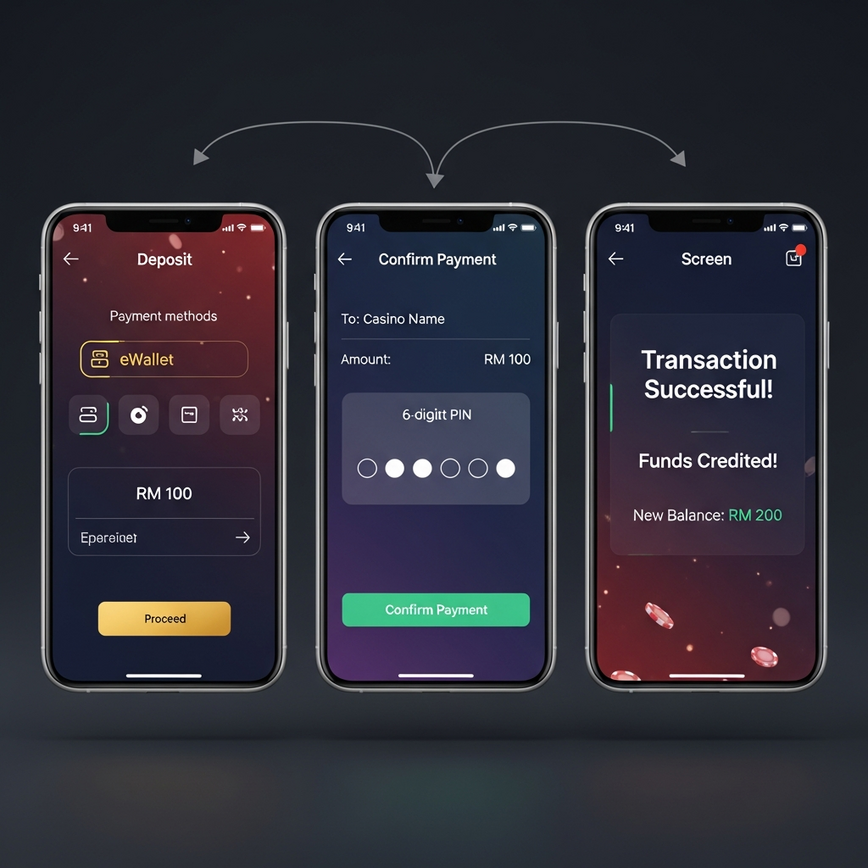
Step 1: Access the Deposit Section
- Log into your Pirate777 account.
- Head over to the “Wallet” section in the main menu. This is your personal banking hub on our site.
- Select “Deposit” from the options.
- Choose “Touch ‘n Go eWallet” from the list of payment methods.
Step 2: Enter Deposit Amount
- Type in how much you want to deposit (minimum RM10, maximum RM5,000).
- You’ll see an instant credit confirmation—we don’t charge any processing fees. What you deposit is exactly what you get to play with.
- Give the amount a quick double-check to avoid any mistakes.
- Click “Continue to TnG Payment”.
Important: Every deposit is processed through our security protocols for maximum fund protection. It’s our promise to you that every transaction is safe.
Step 3: TnG eWallet Authentication
- You’ll be redirected to the official Touch ‘n Go payment gateway. This is a vital security step. It means you’re entering your private details directly on TnG’s secure system, not ours. We never see or store your TnG PIN.
- Enter the mobile number registered with your TnG account.
- Input your 6-digit PIN for your TnG eWallet.
- Confirm the transaction amount matches what you intended to deposit.
Step 4: Transaction Confirmation
- Carefully review the payment summary screen.
- Make sure the merchant name says “Pirate777” or our authorized processor. This confirms you’re paying the right company.
- Tap “Pay Now” to finalize the transaction.
- Wait for the success confirmation message from TnG before you close the window.
Step 5: Return to Pirate777
- You’ll be automatically sent back to our platform. Just let the system do its thing—don’t hit the “back” button.
- Check your wallet balance. Your funds should appear very quickly, typically within a couple of minutes.
- If the balance doesn’t update right away, give it 2–3 minutes before contacting support. Sometimes there’s a tiny delay as the systems talk to each other.
- Take a screenshot of the TnG transaction ID for your records. It’s your proof of payment and helps our support team resolve any issues in a flash.
Troubleshooting Common TnG Deposit Issues
Our Captain’s Support team handles TnG deposit issues with an average response time that ensures quick resolution. Here are the most common reasons for a deposit issue and how to fix them instantly. Don’t worry, these are usually very easy to solve.
TnG eWallet Deposit Not Processing
Issue 1: Insufficient TnG Balance
- Solution: Always check your TnG wallet balance before you try to deposit. This is the #1 reason for failed transactions.
- Prevention: To be safe, try to keep at least an RM15 buffer above your intended deposit amount.
Issue 2: Network Timeout During Processing
- Solution: Wait 5 minutes, then check your Pirate777 wallet balance again. The transaction might have gone through even with an error message. Also, check if the funds were deducted from your TnG wallet.
- Prevention: Use a stable WiFi connection for deposits over RM500. A weak mobile signal can easily interrupt the payment process.
Issue 3: PIN Entry Errors
- Solution: You can reset your TnG PIN through the official TnG app. Be careful, though—too many wrong attempts can temporarily lock your TnG account.
- Prevention: Take your time and enter your PIN carefully, especially before making large deposits.
Issue 4: Transaction Declined by TnG
- Solution: Get in touch with TnG customer service to check for any account restrictions. Sometimes, daily or monthly transaction limits that you’ve set within the TnG app itself can cause this.
- Prevention: Make sure your TnG account is fully verified and that you’re aware of your personal transaction limits.
Emergency Troubleshooting Steps
If your TnG deposit fails or doesn’t show up in your account, screenshot the error, check your TnG history for a deduction, and if deducted but not credited after 5 minutes, contact our support with the screenshot and transaction ID. Our Captain’s Support team responds quickly via Telegram at https://t.me/Pirate777MY or Live Chat and can trace your transaction immediately with the proper details.
Security and Fair Play Compliance
Our 256-bit SSL encryption protects every TnG deposit while our 15 game providers maintain RNG certification from BMM Testlabs, iTech Labs, and GLI for fairness verification. Here’s how we keep your deposits secure:
- 256-bit SSL Encryption: This is advanced protection for all financial data. It scrambles your information as it travels online, making it impossible for anyone else to read.
- Regulatory Compliance: We are committed to providing a secure environment for all transactions and align our operational standards with best practices for player protection.
As part of our commitment to total transparency, we also maintain partnerships with support and advice from GamCare, responsible gambling guidance from BeGambleAware, and self-exclusion tools through GamStop to ensure our platform promotes safe gambling practices.

24/7 Support for TnG Deposits
Our Captain’s Support team provides 24/7 assistance via Telegram and Live Chat for all TnG deposit inquiries. If you ever have a question or run into an issue, we’re here to help you immediately. Here are the best ways to reach us:
- Telegram: https://t.me/Pirate777MY – This is the fastest way to get help from our support team.
- Live Chat: Our direct platform integration allows you to chat with our team in real-time.
We keep detailed logs of every TnG transaction, which allows our support team to quickly track down and resolve any deposit discrepancies. To help us help you faster, please have your TnG transaction ID and the approximate time of your deposit ready when you get in touch. We provide complete transaction details for every deposit attempt to ensure full transparency.
Remember to consult responsible gambling guidance from BeGambleAware and set deposit limits that fit your entertainment budget. For additional support and responsible gambling resources, we recommend consulting organizations like GamCare.
Disclaimer: Pirate777 is intended for users aged 18 and above. Players are responsible for ensuring online gaming is legal in their jurisdiction. Please play responsibly.
Conclusion
Touch ‘n Go eWallet deposits connect you instantly to our 1,700+ certified slot games with deposits from RM10 to RM5,000 per transaction. With our highly reliable deposit system and efficient processing, our TnG integration is all about a frictionless, hassle-free deposit experience. You can trust that your funds are handled quickly and securely every time.
Our 256-bit SSL encryption, certified processing partners, and 24/7 Captain’s Support guarantee that every TnG deposit is handled with the utmost care and efficiency. If you ever run into any issues, our support team is on standby, ready to assist you immediately.
— Pirate777 Team. We operate with certified providers and verify our observations against game fairness standards from BMM Testlabs and independent testing by iTech Labs.
Frequently Asked Questions
TnG eWallet deposit is a fast and secure payment method that allows Malaysian players to fund their Pirate777 accounts using Touch ‘n Go digital wallet. You can deposit from RM10 to RM5,000 per transaction, and the funds are typically credited to your account very quickly. We use 256-bit SSL encryption to protect every transaction.
Log into your Pirate777 account, go to the Wallet section, select Deposit, choose Touch ‘n Go eWallet, enter your amount, and authenticate through the official TnG gateway. The process takes just a few steps and is designed to be completed on your mobile device. We redirect you to TnG’s secure system so we never see your PIN.
TnG eWallet is significantly faster than bank transfers, with deposits typically credited in just a couple of minutes compared to hours for traditional banking. TnG also offers better privacy as transactions don’t show detailed gaming activity on your bank statement. Our platform supports TnG 24/7, while bank transfers may have limited operating hours.
The minimum TnG eWallet deposit is RM10, with a maximum of RM5,000 per transaction. We recommend starting with smaller amounts if you’re new to the platform and gradually increasing as you become more comfortable. Choose amounts that fit your entertainment budget and gaming preferences.
Yes, TnG eWallet deposits are extremely safe on our platform. We protect every transaction with 256-bit SSL encryption and redirect you to the official Touch ‘n Go gateway for authentication. Our platform features games from providers whose RNG and fairness are certified by independent testing labs like BMM Testlabs and iTech Labs. We never store your TnG PIN or sensitive payment information.
The most common reason is insufficient balance in your TnG wallet or a network timeout during processing. Check if funds were deducted from your TnG account first, then wait 2-3 minutes and refresh your Pirate777 wallet balance. If the issue persists, contact our Captain’s Support via Telegram with your transaction ID and timestamp for immediate assistance.