



How to Deposit on Pirate777: DuitNow, ShopeePay & eWallet Guide (2026)
Topping up on Pirate777 takes about two minutes from the Wallet screen. The minimum deposit is RM 10, and you can choose between six funding routes — DuitNow QR, ShopeePay, Touch’n Go, GrabPay, FPX online banking, Bank Transfer, or Telco/TNG PIN reload. eWallet, FPX, and Bank Transfer all credit at 1:1; Telco PINs convert at a discount, so they’re the most expensive route in cash terms. This guide walks through each option with the in-app screens we captured in 2026, and pairs neatly with our Pirate777 account registration guide if you haven’t signed up yet.
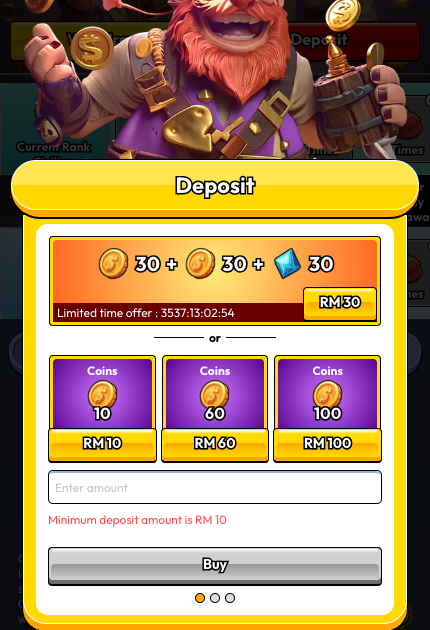
Table of Contents
Before You Deposit
- Make sure your funding source matches your registered name. Pirate777 follows a strict anti-money-laundering rule — the bank account, eWallet, or PIN you use to deposit must be in the same full legal name you registered on Pirate777. Deposits from a third-party account are rejected automatically and the amount is returned to the source. No IC upload is required at the deposit step — only that the names match.
- Minimum deposit: RM 10 across every method.
- Mega888 and 918KISS bets don’t count toward promotional wagering requirements or rebates — platform-wide rule, applies to any deposit bonus you claim.
- Currency: All amounts are in MYR (RM). No foreign card support.
Step-by-Step: Reach the Six Payment Options
The app layers the deposit flow in two steps — you pick an amount first, then you pick a payment method.
Step 1 — Open the Deposit Modal
Tap Wallet in the bottom nav, then tap the red Deposit button at the top. You can also tap the “+” icon in the header from any screen.
Step 2 — Pick an Amount (Mode 1)
The first screen shows coin packages. There’s usually a limited-time offer at the top (e.g. RM 30 → 30 coins + 30 coins + 30 diamonds) and three standard tiers below (RM 10 / RM 60 / RM 100). You can also type a custom amount in the “Enter amount” field. Minimum is RM 10. Tap a tier (or type an amount), then tap Buy.
Step 3 — Pick a Payment Method (Mode 2)
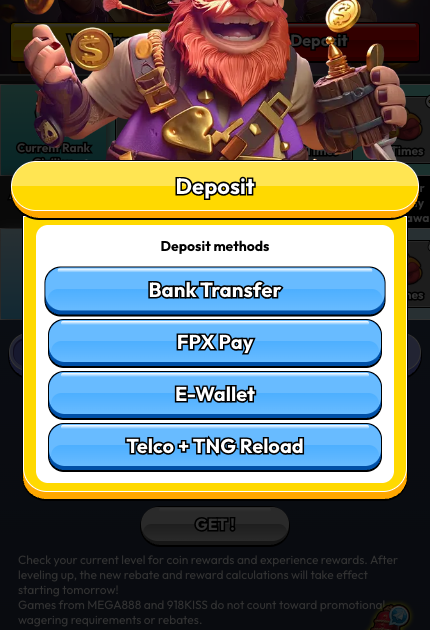
Four buttons appear:
- Bank Transfer
- FPX Pay
- E-Wallet
- Telco + TNG Reload
Option A — E-Wallet (DuitNow, ShopeePay, Touch’n Go, GrabPay)
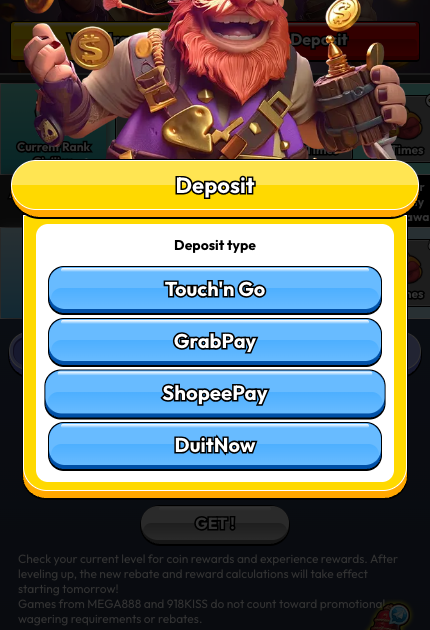
Tapping E-Wallet opens a sub-picker with four options:
- Touch’n Go
- GrabPay
- ShopeePay
- DuitNow
Tap your preferred wallet. The app shows a “GO to [Wallet]” confirmation screen explaining that you’re being redirected to a secure payment window. Tap Deposit completed once the gateway transaction finishes.
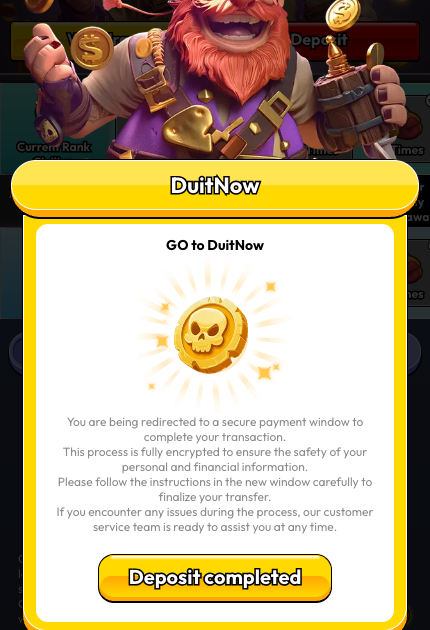
Note on DuitNow. The DuitNow option inside the eWallet picker is the DuitNow QR rail — you’ll be redirected to scan a QR code with your banking or eWallet app. This is separate from DuitNow Transfer (instant account-to-account). If you want to send a DuitNow Transfer from your bank to a Pirate777 account, use Bank Transfer or FPX Pay instead.
When to pick this: you already use the wallet app on your phone and want the fastest flow (usually under 90 seconds). DuitNow QR is the broadest — most Malaysian banks and eWallets support it. If you’re still deciding which wallet to install, our eWallet comparison guide for Malaysian slot players compares them side by side.
Option B — FPX Pay (Online Banking)
Tapping FPX Pay redirects through the SPay payment gateway, which supports all FPX-enrolled Malaysian banks (Maybank, CIMB, RHB, Public Bank, Hong Leong, Bank Islam, BSN, Affin, Alliance, AmBank, UOB, OCBC, and more).
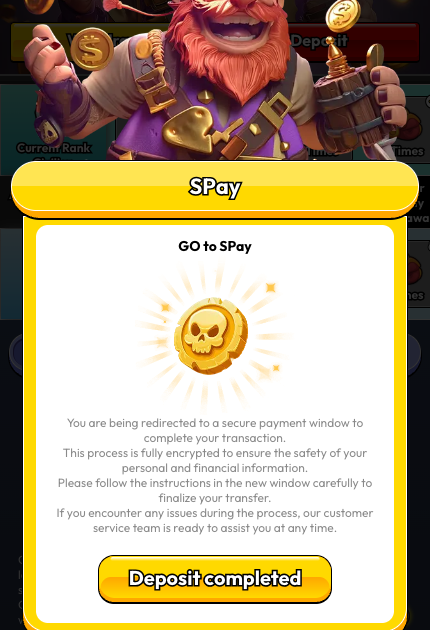
When to pick this: you want to pay directly from your bank account and you have internet banking set up. No wallet balance needed.
Option C — Bank Transfer
Tapping Bank Transfer opens an in-app Online Banking form. The receiving bank, account number, and account name are shown to you in-app at the time of deposit (we’ve redacted them in our screenshot below).
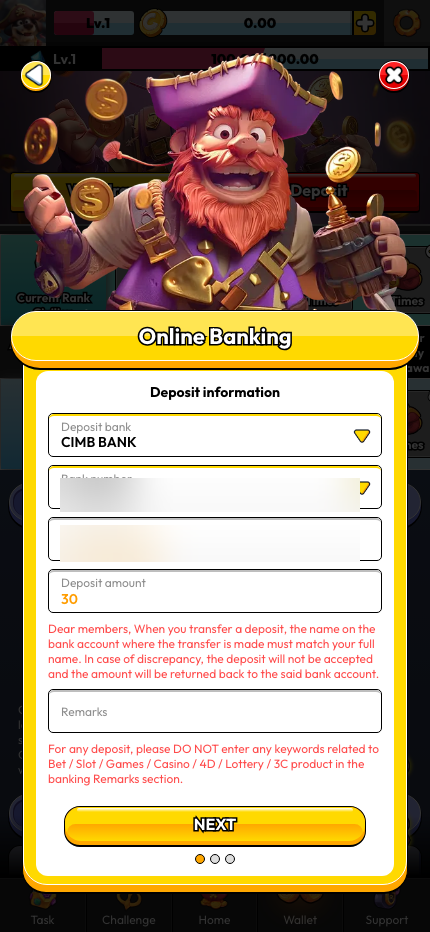
Fields to fill:
- Deposit bank — dropdown (CIMB, Maybank, Public Bank, and others available)
- Bank number — Pirate777’s receiving account number (shown in-app)
- Account name — account holder on the receiving side (shown in-app)
- Deposit amount — match exactly what you transferred
- Remarks — optional reference
Then tap NEXT. Two on-screen warnings to note:
- “When you transfer a deposit, the name on the bank account where the transfer is made must match your full name. In case of discrepancy, the deposit will not be accepted and the amount will be returned back to the said bank account.”
- “For any deposit, please DO NOT enter any keywords related to Bet / Slot / Games / Casino / 4D / Lottery / 3C product in the banking Remarks section.”
When to pick this: you prefer doing the transfer manually in your bank’s app (instant transfer / IBG) and reconciling after.
Option D — Telco + TNG Reload
Tapping Telco + TNG Reload opens an in-app PIN form (no gateway redirect).
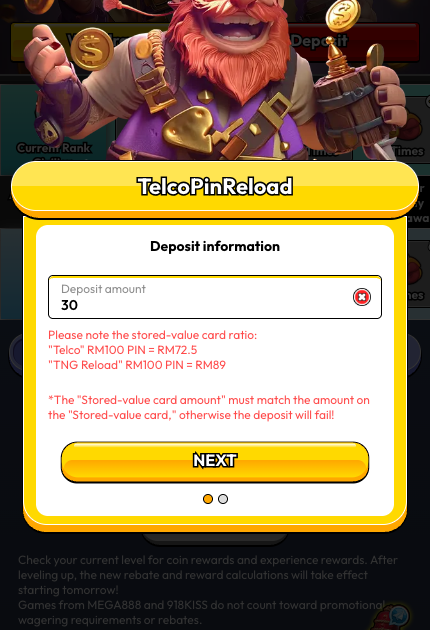
Key conversion ratios shown on-screen:
- “Telco” RM 100 PIN = RM 72.5 deposit
- “TNG Reload” RM 100 PIN = RM 89 deposit
Supported telcos: U Mobile, Celcom, Digi, Hotlink.
Warning on the form: “The ‘Stored-value card amount’ must match the amount on the ‘Stored-value card,’ otherwise the deposit will fail!”
When to pick this: you have a physical or SMS-delivered prepaid PIN and prefer not to connect a bank or wallet. Note the heavy conversion loss — you lose about 27.5% with a Telco PIN and about 11% with a TNG Reload PIN, so it’s the most expensive route in cash terms.
Method Comparison — Quick Pick
| Method | Redirect? | Typical speed | Cost vs deposit | Best for |
|---|---|---|---|---|
| DuitNow QR (E-Wallet) | Yes (3rd-party gateway) | ~30–90 sec | 1:1 | Most Malaysians — scan via bank or wallet app |
| ShopeePay / TnG / GrabPay | Yes (3rd-party gateway) | ~30–90 sec | 1:1 | Existing wallet users |
| FPX Pay | Yes (SPay gateway) | ~60–120 sec | 1:1 | Pay direct from bank, no wallet balance |
| Bank Transfer | No (in-app form) | 5 min – 1 hr (IBG) | 1:1 | Manual transfer, full control |
| Telco PIN | No (in-app form) | Instant on PIN entry | ~72.5% retention | Users with prepaid PINs only |
| TNG Reload PIN | No (in-app form) | Instant on PIN entry | ~89% retention | Users with TNG PINs only |
Common Issues
- “Minimum deposit amount is RM 10” warning. You typed or selected less than RM 10. Increase to at least RM 10.
- Name mismatch on Bank Transfer. The transfer’s sender name must match your full registered name — that’s the #1 reason deposits get bounced back.
- Telco/TNG PIN failure. The PIN value must exactly match the face value on the card. Entering a RM 50 PIN as “100” fails.
- Gateway redirect didn’t complete. If you close the external window before the gateway confirms, Pirate777 doesn’t credit your account. Re-open the gateway from the Deposit completed screen or contact Support (bottom nav → Support chat).
Safety, Privacy, and Responsible Play

Every deposit on our platform runs over 256-bit SSL encryption — the same standard used by Bank Negara Malaysia-compliant payment systems. Payment gateways (SPay for FPX, third-party gateways for eWallet redirects) are independently licensed; Pirate777 itself never sees your full card details, banking credentials, or eWallet PIN — we only see the gateway’s confirmation that your transaction was approved.
We also partner with responsible gaming organisations including GamCare and BeGambleAware. If you want to set deposit limits, take a cool-off period, or self-exclude, contact our 24/7 Captain’s Support team — we set those up on your account directly rather than hiding them behind a self-service menu. Public guidance is available from support and advice from GamCare and responsible gambling guidance from BeGambleAware. Pirate777 is designed for players aged 18 and above. Only deposit what you can afford to lose.
Once your first deposit lands, the next stop is usually our 2.3-minute withdrawal guide for setting up your payout bank, and our Game Academy for finding your first game.
— Pirate777 Team. We operate with independently audited game providers and verify our observations against game fairness standards from BMM Testlabs and independent game testing by iTech Labs.
Frequently Asked Questions
Yes. DuitNow is one of four eWallet options (alongside Touch’n Go, GrabPay, and ShopeePay). The eWallet picker uses the DuitNow QR rail — you’ll scan a code through your banking or eWallet app. Minimum deposit is RM 10 and the transaction is 1:1 with no conversion fee from Pirate777’s side.
RM 10. This applies to every payment method — eWallet, FPX, Bank Transfer, and Telco PIN.
DuitNow QR or ShopeePay if you already have the wallet app set up — typically under 90 seconds end-to-end. FPX Pay is similar. Bank Transfer takes 5 minutes to 1 hour depending on your bank’s IBG schedule. Telco and TNG PINs are instant once you enter the PIN, but they convert at a discount, so they’re the most expensive route.
The platform applies a conversion rate to Telco PINs (U Mobile, Celcom, Digi, Hotlink) — RM 100 face value = RM 72.5 deposit credit. TNG Reload PINs are better: RM 100 = RM 89. eWallet, FPX, and Bank Transfer are all 1:1.
No. Pirate777 follows a strict anti-money-laundering rule: the bank account, eWallet, or PIN you use to deposit must be in the same full legal name you registered on Pirate777. Deposits from a third-party account are rejected automatically and the amount is returned to the source. There’s no IC upload required at the deposit step — only that the names match.
Pirate777’s eWallet picker uses DuitNow QR — you scan a code with your banking app or supported eWallet. That’s the fastest flow (typically under 90 seconds). DuitNow Transfer (a direct account-to-account push from your bank’s app) isn’t exposed as a separate button — if that’s your preferred rail, use Bank Transfer or FPX Pay and it routes through the same network.
No platform fee from Pirate777’s side. Any fees you see are from your bank or wallet provider.